Featured

Task 1: Learning Technology Critique

Tayasui Sketches

The increase evolution in technological advancements allow for educational systems to develop a visual understanding of literal means of teaching children the importance of critical thinking found in creative learning.

‘Creative thinking involves students learning to generate and apply new ideas in specific contexts, seeing existing situations in a new way, identifying alternative explanations, and seeing or making new links that generate a positive outcome.’

– Australian Curriculum: Creative Thinking (ACARA, 2020)

Tayasui Sketches is a digital-illustration app used for visual and spatial literacy in all primary and secondary age groups. It allows for students to critically extract information from visuals, enhance problem solving by expressive artistic visuals and using the different tools to represent visual art as a form of communication and expression.

‘The Most Realistic Tools’ used in Tayasui Sketches. Tayasui Sketches (n.d.) Retrieved from: https://tayasui.com/sketches/

This free tool is found in Android and the Apple app store, making it easily accessible for all students. However, the expensive cost of $199 Apple Pencil (second generation) and a minimum cost $529 to $1229 iPad that must be available for students to use whilst being in the classroom.

Depending on the use of the tool and the tool itself, students can fully experience the sensation of feeling the tool as a real tool when using the app. This includes, water-colouring, editing layers, acrylic brushes, oil-painting, colour mixing, different patterns and gradient.

Apple Pencil (2nd Generation) A$199
Retrieved from: https://www.apple.com/au/shop/product/MU8F2ZA/A/apple-pencil-2nd-generation

The students draw on curiosity, imagination, design thinking and computational skills and responding to different forms of artworks, providing an opportunity to create or erase mistakes without the worry of repetitively reloading resources. The app also has a effective feedback past/present artworks and performances which allows the student to see that mistakes can

The appeal to student analyses their motivations, intentions and influencing factors such as increasing collaboration of group work when customising potential independant learning. This increases the emphasis on visual literacy in everyday life and learning by building understanding and interpreting experience. By experimenting, drawing modelling, designing and working with digital tools, equipments and software helps build visual and spatial thinking to create solutions, products, services and environments.

Not only is this app an enjoyment of creativity to relevant content within the classroom but increases multimodal nature of literacy learning found in the exploration of visual arts in mobile technologies. (Rushton & Callow, 2019)) Gattenhoff and Dezuanni (2015) highlight an early childhood setting involving several considerations of the intervention and redirection of adults leading towards visual arts learning with iPads. As it should be complement and not supplant to physical arts engagement when creating artworks from scratch when comparing other templates.

Children can personalise their own representation of main characters found in favourite novels to understand their viewpoint of how the character is feeling or expressing in the novel. Here is a great example of a ‘Classroom Experience Creating a Personalised Emoji by Drawing with Everyone can Create on iPad’. Created by Jacob Woolcock’s Experience drawing in a Primary Classroom. Retrieved from: https://www.youtube.com/watch?v=zAdV54ZriNY

Reference List

Apple (2020) iPad. Retrieved from: https://www.apple.com/au/ipad/

Apple (2020) Apple Pencil. Retrieved from: https://www.apple.com/au/apple-pencil/

Australian Curriculum, Assessment and Reporting Authority (ACARA). Critical and Creative Thinking. Retrieved at: https://www.australiancurriculum.edu.au/f-10-curriculum/general-capabilities/critical-and-creative-thinking/

(Top Image) Enksodsoon. (n.d.) Sketches Community: The View. Retrieved from: https://tayasui.com/sketches/hallOfFame.php?appID=2

Gattenhof, S., & Dezuanni, M. (2015). Arts education and iPads in the early years. In M. Dezuanni, K. Dooley, S. Gattenhof, & L. Knight (Eds.), IPads in the early years: Developing literacy and Creativity (pp.30-43). London: Routledge.

Rushton, K., & Callow, J. (2019) A Gallery of Practices – Mobile Learning, Language and the Arts (K-6). In Oakley, G. (Eds.) Mobile Technologies in Children’s Language and Literacy: Innovative Pedagogy in Preschool and Primary Education. (pp. 36) UK: Emerald Pushlishing.

Tayasui Sketches (n.d.) The Most Realistic Tools. Retrieved from: https://tayasui.com/sketches/

Woolcock, J. (2019) Classroom Experience Creating a Personalised Emoji by Drawing with Everyone can Create on iPad. Retrieved from: https://www.youtube.com/watch?v=zAdV54ZriNY

Constructivism and the Marker

Figure 1: Seymour Papert
Ko, A.J. (2017) Mindstorms: what did Papert argue and what does it mean for learning and education? Retrieved from: https://medium.com/bits-and-behavior/mindstorms-what-did-papert-argue-and-what-does-it-mean-for-learning-and-education-c8324b58aca4

Since mid-1960s, Australian Seymour Papert (2004) spent his career inventing tools, toys, software and projects that educate students of computer-science knowledge that aims at academics, teachers and parents. As future educators, preservice teachers should help to teach students about how creativity can maintain the viability of school and ensure powerful ideas recreation. (Stager, 2016) Even inside a prison for teenagers, students can still learn about constructivist methodology teaching shown in understandable concrete materials. (Stager et. al., 2016)

In a developing world, the overridden legislative resistance for each student to obtain a personal computer in secondary schools gave birth to the ‘maker movement’. The inspiration for students to engage in technological behaviours of students dealing with computers. (Papert, 2004) In this case, Papert believed that every class should become engaging though student creative expression, relatively purposeful lessons to each individual.

Circuitscribe is an innovative way of teaching circuitry and electricity through digital constructionist tools that help with STEM experiences. The very idea of a student inventing electricity within the classroom provides an opportunity of introducing electronic circuitry. (Richard, Giri, Mckinley, & Ashley, 2018). However, with the introduction of computers in the classroom, the introduction of electricity should also be included in the creativity learning process.

Figure 2: Circuit scribe title found on the main website.
Circuitscribe (2020) Circuit scribe. Retrieved from: https://circuitscribe.com/

In broadening marker learning, class participation associated with content creation tools in activities within the classroom allow students to blend multiple toolkits and technological devices. (Narumi, Shi, Hodges, Kawahara, Shimizu, & Asami, 2015) These items include the expensive $59.99 The Super Kit that involves the conductive ink pen, circuit stencils, workbook and course sheets.

Figure 3: Super Kit
Circuit Scribe (2020) Super Kit. Retrieved from: https://circuitscribe.com/products/super-kit

Other forms of free technological device include the free demo app which can be displayed on any software. (However, students are more likely to use apple software such as the iPad, iPhone or iOS within the classrooms).

The different course sheets contain modules that students are introduced to as advanced concepts of light, sounds and circuitry that explores conductivity, signal processes, inputs, outputs and touch-sensitive circuits. This may include step-by-step projects found on YouTube, free downloadable scientific curriculums and an inventor’s notebook which reflect how the app can teach students how circuitry works. (Oh, Ta, Suzuki, Gross, Kawahara, & Yao, 2018)

Figure 4: The is video providing the basics of resources and materials used in Circuit Scribe Electronics.
Circuit Scribe (2020) Circuit Scribe Electronics 101: Episode 1 – The Basics. Retrieved from: https://www.youtube.com/watch?time_continue=12&v=l74PgfLZFNA&feature=emb_title

References

Circuitscribe (2020) Circuit scribe. Retrieved from: https://circuitscribe.com/

Circuit Scribe (2020) Circuit Scribe Electronics 101: Episode 1 – The Basics. Retrieved from:https://www.youtube.com/watch?time_continue=12&v=l74PgfLZFNA&feature=emb_title

Circuit Scribe (2020) Super Kit. Retrieved from: https://circuitscribe.com/products/super-kit

Hoyles, D., & Noss, R. (2017). Visions for Mathematical Learning: The Inspirational Legacy of Seymour Papert (1928–2016). EMS Newsletter, 2017-3(103), 34-36.

Ko, A.J. (2017) Mindstorms: what did Papert argue and what does it mean for learning and education? Retrieved from: https://medium.com/bits-and-behavior/mindstorms-what-did-papert-argue-and-what-does-it-mean-for-learning-and-education-c8324b58aca4

Narumi, K., Shi, X., Hodges, S., Kawahara, Y., Shimizu, S., & Asami, T. (2015). Circuit Eraser: A Tool for Iterative Design with Conductive Ink. Proceedings of the 33rd Annual ACM Conference Extended Abstracts on Human Factors in Computing Systems, 18, 2307-2312.

Oh, H., Ta, T., Suzuki, R., Gross, M., Kawahara, Y., & Yao, L. (2018). PEP (3D Printed Electronic Papercrafts): An Integrated Approach for 3D Sculpting Paper-Based Electronic Devices. Proceedings of the 2018 CHI Conference on Human Factors in Computing Systems, 2018, 1-12.

Papert, S. (2004). Interviews with Seymour Papert. Computers in Entertainment (CIE), 2(1), 9.

Richard, G., Giri, S., Mckinley, Z., & Ashley, R. (2018). Blended making: Multi-interface designs and e-crafting with elementary and middle school youth. Proceedings of the 17th ACM Conference on Interaction Design and Children, 675-680.

Stager, G.S (2016). Seymour Papert (1928–2016). Nature, 537(7620), 308.

Digital Gaming and Design

Digital gaming is designed for a multidisciplinary that integrate cross-curriculum processes through complex decision making and material choices that reward student engagement in different learning processes which can incorporate integrated designs of various disciplines though immersing student in of virtual world gaming. (Vassigh, 2008)

Figure 1: Minecraft title page where students load regular or creative game codes. (Gallagher, Asselstine, 2015)

Minecraft is a first-person digital game designed for players to create a world from their own imagination when placing and removing blocks with different game modes as a single-player or multiplayer. (Gallagher, Asselstine, 2015) In education, different skills can be used within this game, including collaboration of teamwork active, creative motivation, differentiation of other students, digital clientship over independent ownership, engagement in cross-curricular activities, well-planned feeling of accomplishment, independent leadership in creating their own projects and a fun a relevance to real-world activities on a technological device rather than a book. (Gallagher et. al., 2015)

Minecraft Edu in educational learning environments increase technological fundamentals in classrooms today. (Callaghan, 2016) In this case, educational games support collaborative learning safely and that are meaningful to the user in key learning areas. The gamification of enhancing Minecraft users with enhancing services, behaviour outcomes, digital or non-digital environments that players can explore. (Kapp, 2015) The advantages of involving Minecraft in classrooms, include time efficiency, student engagement, increase teacher-student relationships, creative tasks, attain learning outcomes, and collaborative student behaviour. (Ellison & Evans, 2016)

Figure 2: These are some cross-curriculum Activities in Minecraft.
Minecraft Education Edition (2020) Subject Kits. Retrieved from: https://education.minecraft.net/class-resources/lessons/

Mathematics in Minecraft has huge potential. (Bos, Wilder, Cook, O’Donnell, 2014) The use of new tools to solve mathematical problems and create different configurations that pertinent questions that reflect the Australian curriculum. (Mills, 2016) Students develop an increasing sophisticated understanding of mathematical concepts and reasoning that is able to recognise connections, easily accessible to multidisciplinary studies between the player as active citizens. Some of those multidisciplinary studies include perimeter, area, volume and conversion of units.

Figure 3: This is a cube measurement that can be used in the Minecraft world that can measure volume. (Barba, 2015)

When exploring an open-world environment, students are still able to create and learn. (Barba, 2015) For example, students are able to find the volume of a Minecraft block and then use that formula to measure the volume of their own structure and creations.

References

Barba, J. (2015). THE MATH OF MINECRAFT. Scholastic Math Magazine, 35(8), 8-11,T7.

Bos, B., Wilder, L., Cook, M., & O’Donnell, R. (2014). Learning mathematics through Minecraft, Teaching Children Mathematics, 21(1), 56-59.

Callaghan, N. (2016). Investigating the role of Minecraft in educational learning environments. Educational Media International, 53(4), 244-260.

Ellison, T., & Evans, J. (2016). “Minecraft,” Teachers, Parents, and Learning: What They Need to Know and Understand. School Community Journal, 26(2), 25-43.

Gallagher, C., & Asselstine, S. (2015). Minecraft in the classroom : Ideas, inspiration, and student projects for teachers / Colin Gallagher, editor ; with Shane Asselstine [et al.]. San Francisco]: Peachpit Press.

Kapp, K. (2015). The gamification of learning and instruction: Game-based methods and strategies for training and education (1st ed.). USA: Wiley.

Mills, P. (2016). Minecraft and mathematics. Vinculum, 53(1), 15.

Minecraft (2020) Minecraft. Retrieved from: https://www.minecraft.net/en-us/

Minecraft Education Edition (2020) Subject Kits. Retrieved from:  https://education.minecraft.net/class-resources/lessons/

Vassigh, S. (2008) Digital Gaming and Sustainable Design, Enquiry: The ARCC Journal of Architectural Research, 5(2),

Virtual Reality

Virtual Reality (VR) technologies is a productive tool for 3D Educational Virtual Environments (VLEs) that arise technical affordance implicit in 3D learning environments. (Hong, Yokoya, Chanussot, & Zhu, 2019) The different pedagogical understandings of theories developed can highlight concerns about involving virtual concerns and possible theory input.

  • The use of Dalgarno and Lee’s (2010) model not only concerns technological concerns but pedagogical considerations that interact with representational fidelity and student learning interactions with realistic embodiment of communication skills shown in virtual reality. (p. 10-32)
  • Fowlers and Mayes (1994)’s generic learning activities based on Bloom’s (1956) Learning Taxonomy that conceptualisation, construction and dialogue that best requires Conole’s (2004) mini-learning activities.

Cospace is a creative web software where individuals can create their own virtual world. (Selfridge, Kirk, 1999) It is an adaptable software that can link social sciences, maker-space, art, language, literature, STEM and coding. This is a web app that can be easily accesses with any compatible Chromebook, including computers (MacBook/Microsoft), tablets (iPad), and mobile devices (iPhone/Andriod). (Cospace, 2020)

Image of Cospace. It is a possible software that can be used to create and alternative VR.
Cospace (2020) Cospace. Retrieved from: https://cospaces.io/edu/

Students can enhance digital literacy skills that dynamically generate and interconnect 3D virtual environments that captivate engaging student’s learning. This includes ubiquity, adding content, portal architecture, flexible spaces to customise shared objects, programmability and robotics. (Hong et. al., 2019)

These are come different potential cross-curriculum links that Cospace has in different VR worlds.
Cospace (2020) Cospace. Retrieved from: https://cospaces.io/edu/

In the twenty first century has the potential to establish innovations that can change students social understanding that can be adopted outside of the classroom. (Psotka, 2013) The increase computer power and lower costs of afforded 3D allow students to easy access newer genres of VR gaming in education. This may include Multi-User Dungeons (MUDs), Massively Multiplayer Online Role-Playing Games (MMORPGs) found in Persistent Worlds (PWs) or realistic virtual worlds.

The Kremer Collection is part of the Kremer Museum that is a new concept that combines VR technology with ancient history in the Dutch Golden Age. Students are able to walk through traditional museums in a new perspective. It is as if the student is able to walk through the museum in their own room.

HTC VIVE (2018) The Kremer Collection VR Museum | Moyosa Media BV | On Viveport. Retrieved from: https://www.youtube.com/watch?v=tRuCLhVjXfc

Future learning progressions of VR may involve avoiding scientific misconceptions, exploiting the power of disruptive technology, structural school change, student learning experiences in classrooms and possible future workforce involvements. (Psotka et. al, 2013)

References:

Aczel, P. (2017). VIRTUAL REALITY AND EDUCATION – WORLD OF TEACHCRAFT? Perspectives of Innovations, Economics and Business, 17(1), 6-22.

Bloom, B. S. (Ed.) (1956). Taxonomy of educational objectives: the classification of educational goals. New York: Longman.

Conole, G., Dyke, M., Oliver, M. & Seale, J. (2004). Mapping pedagogy and tools for effective learning design. Computers & Education, 43, 17–33.

Cospace (2020) Cospace. Retrieved from: https://cospaces.io/edu/

Dalgarno, B. & Lee, M. (2010). What are the learning affordances of 3-D virtual environments? British Journal of Educational Technology, 41, 10–32.

Fowler, C. J. H. & Mayes, J. T. (1999). Learning relationships from theory to design. Association for Learning Technology Journal, 7, 6–16.

Fowler, C. (2015). Virtual reality and learning: Where is the pedagogy? British Journal of Educational Technology, 46(2), 412-422.

Hong, D., Yokoya, N., Chanussot, J., & Zhu, X. (2019). CoSpace: Common Subspace Learning From Hyperspectral-Multispectral Correspondences. IEEE Transactions on Geoscience and Remote Sensing, 57(7), 4349-4359.

HTC VIVE (2018) The Kremer Collection VR Museum | Moyosa Media BV | On Viveport. Retrieved from: https://www.youtube.com/watch?v=tRuCLhVjXfc

Psotka, J. (2013) Educational Games and Virtual Reality as Disruptive Technologies, Journal of Educational Technology & Society, 16(2), 69-80.

Selfridge, P., & Kirk, T. (1999). Cospace: Combining Web browsing and dynamically generated, 3D, multiuser environments. Intelligence, 10(1), 24-32.

Steam (2020) The Kremer Collection VR Museum. Retrieved from: https://store.steampowered.com/app/774231/The_Kremer_Collection_VR_Museum/

Augmented Reality

Icon of Catchy Words App. App Store (2020) Catchy App AR.Retrieved from: https://appadvice.com/game/app/catchy-words-ar/1266039244)

Augmented reality (AR) is a technology that allows enhanced computer-based virtual imagery that overlay interactive digital elements into realistic environments. (Wu, Lee, Chang, & Liang, 2013; Azuma, 1997; Zhou, Duh, & Billinghurst, 2008) When students are experiencing augmented reality, their experience enhance their own individual learning that provide different phenomena experiences with emerging technologies and engages student abstraction different conceptions. (Lee, 2012) This provides opportunities for all students within the classroom to create their own world within and outside of the technology.

Over the years, AR programs have developed into easily accessible for all students by using mobile devices. When connecting and utilizing innovative mobile devices, wearable computers and/or immersion technologies, such as the iPad or iPhone can be easily accessible yet expensive. However, learners are able to coexist with virtual objects in a two to three-dimensional synthetic environments that visually are complex in different spatial relationships. (Bronack, 2011; Klopfer & Squire, 2008)

Educational AR games have the potential to enable new forms of learning and transform new learning experiences within the classroom. (Geroimenko, 2019) Even with game genre leverages of convectional education processes, the learning environment to adapt to diverse benefitable paradigms can be used to model creative learning.

Catchy Words AR is a word game app that immerses the student into exploring realistic environments whilst still being connecting into the virtual world when catching different letters. Regardless of age, individuals can show their literacy skills when problem solving and still develop from individual experiences.

In a primary school atmosphere, students can problem solve and create words that are formed with the app.
AR Critic (2017) Catchy Words Gameplay – ARKit Word-solving game. Retrieved from: https://www.youtube.com/watch?v=7A7tItEDwp8

Some pedagogical considerations that should be taken concern are the innovative and inflexibility approaches that involve naturalistic instructional constraints that cover AR content. (Kerawalla, Luckin, Seljeflot, Woolard, 2006) Students should be engaged, contextualized with different educational information instead of instructional authority given to students by teachers that restrict creative output within the classroom. Students should embody participatory play and model supporting progression when examining individual role differences when learning in an AR environment. (Enyedy, Danish, Delacruz & Kumar, 2012)

References

App Store (2020) Catchy Words AR. Retrieved from: https://apps.apple.com/us/app/catchy-words-ar/id1266039244

AR Critic (2017) Catchy Words Gameplay – ARKit Word-solving game. Retrieved from: https://www.youtube.com/watch?v=7A7tItEDwp8

Azuma, R.T. (1997). A survey of augmented reality. Presence: Teleoperators and Virtual Environments, 6(4), 355-385.

Bronack, S.C. (2011) The role of immersive media in online education, Journal of Continuing Higher Education, 59(2), 113-117.

Enyedy, N., Danish, J.A., Delacruz, G. & Kumar, M. (2012) Learning physics through play in an augmented reality environment, International Journal of Computer-supported Collaborative Learning, 7(3), 347-378.

Geroimenko, V. (2019). Augmented Reality Games II : The Gamification of Education, Medicine and Art / edited by Vladimir Geroimenko. (1st ed. 2019. ed.)

Lee, K. (2012). Augmented Reality in Education and Training. TechTrends, 56(2), 13-21.

Kerawalla, L., Luckin, R., Seljeflot, S., & Woolard, A. (2006) “Making it real”: exploring the potential of augmented reality for teaching primary school science, Virtual Reality, 10(3), 163-174.

Klopfer, E. & Squire, K. (2008) Environmental detectives: the development of an augmented reality platform for environmental simulations, Educational Technology Research and Development, 56(2), 203-228.

Wu, H., Lee, S.W., Chang, H. & Liang, J.C. (2013). Current status, opportunities and challenges of augmented reality in education (Report). Computers & Education, 62, 41.

Zhou, F., Duh, H.B.L., & Billinghurst, M. (2008). Trends in augmented reality tracking, interaction and display: A review of ten years of ISMAR. IEEE International Symposium on Mixed and Augmented Reality, 15-18. Cambridge, UK.

Microbit

Figure 1: A Micro:bit. Retrieved from:https://microbit.org/

Computer-science programming is a constructivist theory of educational learning that teachers instruct conceptual objectives, pedagogical interventions and impactful environments found in problem-based learning challenges. (Sorva, 2013) To educate students about computer-science concepts regardless of understanding programming skills, teachers need to engage students with computing programs that allow freedom of coding and expression and creativity.

BBC’s Micro:bit is a pocket-sized computer used within primary and secondary tools to teach students about computer-science coding and programming. It is packed with input/output sensors, accelerometer, programmable LED lights, power port, built-in compass/ accelerometer, connectors and radio communication features such as Bluetooth Smart antenna connection that controls Micro:bit’s programming from a computer. (Schmidt, 2016, Figure 2)

Figure 2: BBC’s Microbit hardware that shows the different components of connection and processing input/output. (Schmidt, 2016)

The device allows children to code a single-board computer that visually maximise internet links with other technological devices, including a mobile device. (Anonymous, 2016) The use of connecting a Micro:bit to a smart phone device allows for students to control a mini microcomputer that coding program changes the devices interior programming controls to adapt to the programmer’s needs. (Sorva et. al, 2013)

The renewing interest of offering opportunities for creative collaboration when creating engaging tasks that are motivational and accessible to all potential Micro:bit students. (Sentence, Waite, Hodges, Macleod, Yeomans, 2017) There are many different cross-curricular activities that links towards art, science, geography, mathematical and technical school subjects. However, the massive amounts of learning potential may risk overwhelming the students with the large amounts of choices of materials. (Sentence et. al., 2017) Students who meet required programming provided by new curricular activities can teach fellow peers the effectiveness of gaining significant workshop interventional skills when working in groups. (Carlborg, Tyrén, Heath, & Eriksson, 2018)

In a secondary classroom, computing fundamentals through cyber security cryptography and creative design projects should already be developed into computing concepts. The transformation of problem-solving world issues through design challenge activities shown in Micro:bit allows students to enhance technical developments faster as computer-science students.

Resources

Anonymous. (2016). BBC micro:bit: Back to the future of computing! Linux Format, (209), 44.

Carlborg, N., Tyrén, M., Heath, C., & Eriksson, E. (2018). The Scope of Autonomy Model: Development of Teaching Materials for Computational Thinking in Primary School. Proceedings of the Conference on Creativity and Making in Education, 137702, 37-44.

Micro:bit (n.d.) Micro:bit. Retrieved from: https://microbit.org/

Schmidt, A. (2016). Increasing Computer Literacy with the BBC micro:bit. IEEE Pervasive Computing, 15(2), 5-7.

Sentance, S., Waite, J., Hodges, S., Macleod, E., & Yeomans, L. (2017). “Creating Cool Stuff”: Pupils’ Experience of the BBC micro:bit. Proceedings of the 2017 ACM SIGCSE Technical Symposium on Computer Science Education, 531-536.

Sorva, J. (2013). Notional machines and introductory programming education. ACM Transactions on Computing Education (TOCE), 13(2), 1-31.

Teiermayer, A. (2019). Improving students’ skills in physics and computer science using BBC Micro:bit. Physics Education, 54(6), 8.

Ozobot

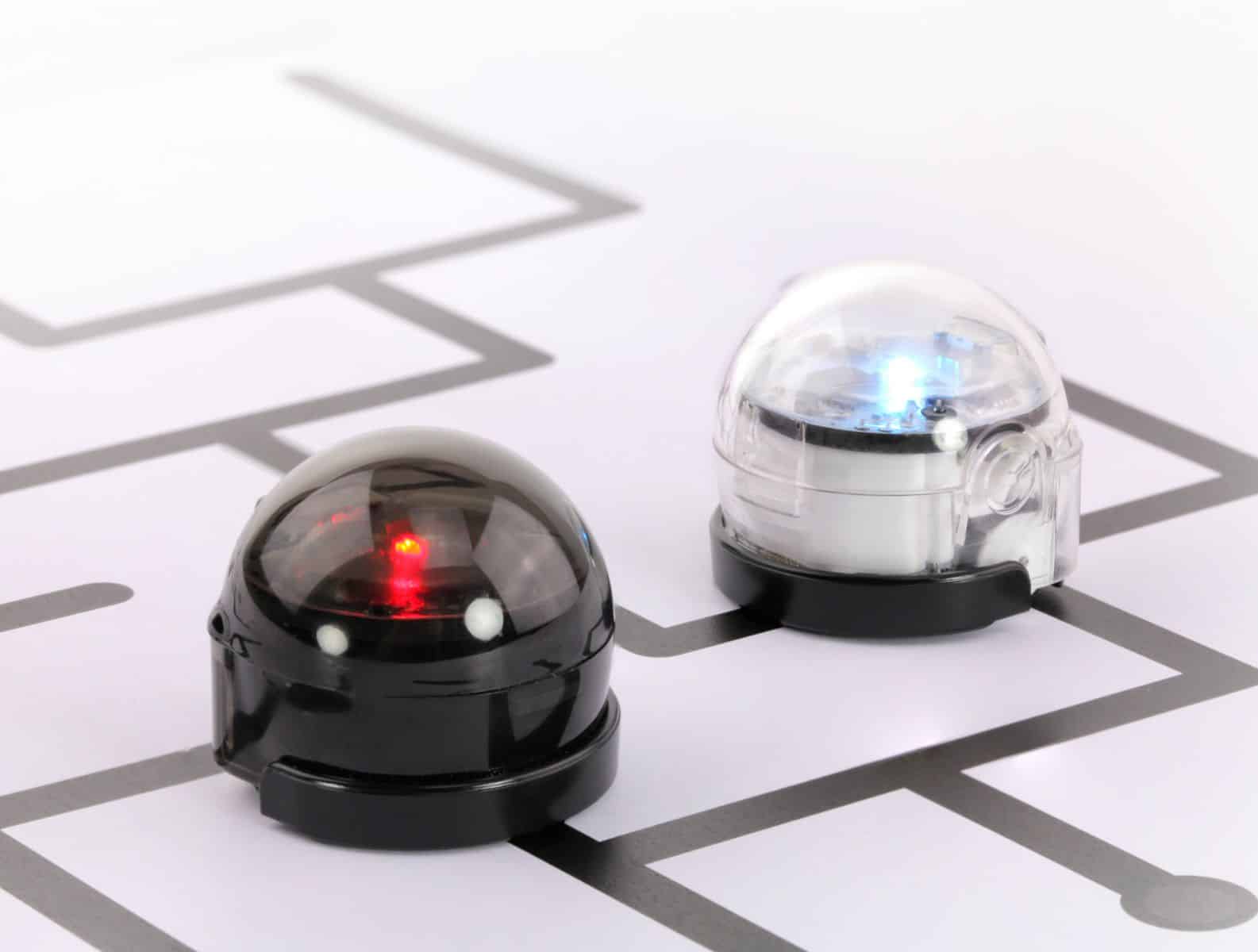
The Ozobot bit is a robot that allows for children to start learning about computer science and STEM programs at an early pedagogical level.
Hsu, A. (2015) Ozobot bit is a fun programmable robot for kids to learn code. Retrieved from: https://www.hellowonderful.co/post/ozobot-bit-is-a-fun-programmable-robot-for-kids-to-learn-coding/

In education over the past few years, robotics has provided students with practical experiences for understanding STEM (Science, Technology, Engineering, Mathematic) language and systems that adapt in constant variations of change over the complex development of environmental situations across different contexts. (Ronald, Bloom, Carpinelli, Burr-Alexander, Hirsh, Kimmel, 2010; Zeidler, 2016; Jung, Won, 2018)

The Ozobot is a new, no cost platform to teach coding with the development of robotics and STEAM measured century skills in the 21st century. This creative Ozobot bit uses a robotic motor to move around on physical or digital surfaces. The built in colour sensor with LED lights that can identify the different lights, colours and codes when individiuals uses computer-science coding programs such as Ozoblockly or Colour Codes.

Ozobot inside a Year One Classroom teaches them about multilteracies in English and different coding skill pedagogies.
Integrating Ozobots in 1st Grade ELA Lesson – Coding in the classroom by Mr Vacca. Retrieved from: https://www.youtube.com/watch?v=_nOeCh_KOJM

Ozoblockly is a visual programming language that use coding to control movement and behaviour of your Ozobot’s Evo and bit in modern browsers, iPads and Android tablets. The Colour Codes allow for Ozobots’ instructions through coding concepts of cause/effect, critical thinking and debugging through the use of sensors to follow lines and read colour codes on white paper. To control the behaviour of a tangible model by means of environmental education allows for innovation to access new technologies, promotion of creativity, support and teamwork in an early stage of education (Alimisis, 2012) The technologoical advancements of robotics in a well-designed curriculum for any educational provides a framework of guidance for computer-engineering curricular and extracurricular activities.

Robotics in education directly observes the practical application of theoretical concepts in the fields of mathematics and technology in the 21st century. (Curto & Moreno, 2016) The Teacher Education in Robotics-enhanced Constructivist Pedagogical Methods (TERECoP) is a constructivist pedagogy that continues to implement idea of collaborating with teachers and school in formal and informal settings to teach enhanced robotics. (Alimisis, 2012) This interdisciplinary, project-based and robot-based learning activities involving the Ozobot draws upon different STEM subjects that involve the teachers and students to learn programming concepts in physics informing classes of secondary education explicitly and students deepen their knowledge in curricular and extracurricular activity values.(Alimisis, 2012; Curto & Moreno, 2016)

References

Alimisis, Dimitris (2012). Robotics in Education & Education in Robotics: Shifting Focus from Technology to Pedagogy. Robotics in Education Conference, 2012.

Curto, B., & Moreno, V. (2016). Robotics in Education. Journal of Intelligent & Robotic Systems, 81(1), 3-4.

Hsu, A. (2015) Ozobot bit is a fun programmable robot for kids to learn code. Retrieved from: https://www.hellowonderful.co/post/ozobot-bit-is-a-fun-programmable-robot-for-kids-to-learn-coding/

Jung, S., & Won, E. S. (2018). Systematic review of research trends in robotics education for young children. Sustainability, 10(4), 905.

Ozobot (n.d.) Ozobot. Retrieved from: https://ozobot.com/

OzoBlockly (n.d.) OzoBlockly. Retrieved from: https://ozoblockly.com/

Ronald, R.; Bloom, D.S.; Carpinelli, J.; Burr-Alexander, L.; Hirsch, L.S.; Kimmel, H. (2010) Advancing the “E” in K-12 STEM Education. J. Technol. Stud. 36.

Zeidler, D.L. (2016).STEM education: A deficit framework for the twenty first century? A sociocultural socioscientific response. Cult. Stud. Sci. Educ. 11, 11–26.

SketchUp

Figure 1: An example of 3D Printing.

SketchUp is a conceptual modelling tool used for three-dimensional creativity and technical productivity within the classroom. (SketchUp, 2020) Students are able to visualise and create their ideas on a computer-aided design (CAD) that is incredibly sophisticated that professionally develops extended productivity for a twenty first century classroom. (Singh, 2010) This allows students to develop extended knowledge into more disruptive technologies that further conceptual properties to solve problems by using mathematical visualisation when turning two-dimensional objects formats on paper into a three-dimensional object on a web-based software. (Figure 1 & 2)

In a primary classroom, students are able to easily access sketch up from a web-based search. This allows the learning curve for beginners to create highly complex models effortlessly starting from the visual replica of different objects of cross-curriculum course material. (Figure 1 & 2) For example, in a primary mathematics classroom, students can create a building and using that building for calculating the area/perimeter of the whole house or features of the house. (Education Standards Authority, 2019)

Figure 2: SketchUp is used for 3D printing and this is an example of how a personalised student can create their own image of their own houses.

Secondary students can collaboratively create 3D models within a classroom environment that allows students to share creative thought and problem-solving understanding in group work assessment tasks. (Goldberg, 2002) For example, in an ancient history classroom, students are able to replicate artefacts, buildings or historical artworks found across many different civilisations. (shown in figure 3). This allows students to understand the process of creating the artefact itself whilst involving the creativity of creating their very own artefact in real life with 3D printing. (Evans, 2012) By using Bloom’s Taxonomy, teacher assessment of observation and analysing student’s progression of team efficiency and individual inspiration during active learning. (Krathwohl, 2002)

3D Warehouse’s image of a Fontana Domus Romana that was created by Gianluca. This is a perfect example of how cross-curriculum activities (such as ancient history) can be linked with technological advancements of 3D printing.

SketchUp is a designing tool that help students use less resources to develop and create high-efficiency buildings. By using adjustable-width electronic pencils and markers, students can effectively use a methodology to create electronic drawings that easily copy sketches on paper onto computer’s clipboard and paste them into direct-draw LCDs that become an integral part of preliminary Architecture, Engineering and Construction (AEC) designs. (Goldberg et. al., 2002)

References:

3D Warehouse (2020) Fontana Domus Romana by Gianluca D. Retrieved from: https://3dwarehouse.sketchup.com/model/2661359e741a8fb8eae46e98c6fda958/Fontana-Domus-Romana

Chopra, A. (2014). SketchUp 2014 for dummies. Hoboken, New Jersey: John Wiley & Sons.

Education Standards Authority (2019) Course Content. Retrieved from: https://educationstandards.nsw.edu.au/wps/portal/nesa/k-10/learning-areas/mathematics/mathematics-k-10/content

Evans, B. (2012). Practical 3D Printers : The Science and Art of 3D Printing. Berkeley, CA: Apress.

Goldberg, H. (2002). New digital design tools spark your creativity. CADalyst, 19(6), 24-29.

Krathwohl, D. (2002). A Revision of Bloom’s Taxonomy: An Overview. Theory Into Practice 41(4): 212-218.

Singh, S. (2010). Beginning Google SketchUp for 3D Printing. Berkeley, CA: Apress.

SketchUp (2020) SketchUp. Retrieved from: https://www.sketchup.com/

Note: Figures one and two pictures were taken by Melek Karacete

Introducing Melek Karacete

Good Evening, I am a pre-service primary school teacher currently attending Macquarie University’s Bachelor of Arts with Education (Primary). Recently, I have been learning several different variations on the development of creativity within educational systems. EDUC3620: Digital Learning and Creativity allows for me to enjoy educational learning with a twist of crazily learning about the curriculum in a different perspective.

Design a site like this with WordPress.com
Get started